Admissions & student records
A complete record for every student from admission to leaving.


Education
Admissions, fees, attendance, exams and result cards for schools.
Configured for the way each of these businesses actually works.
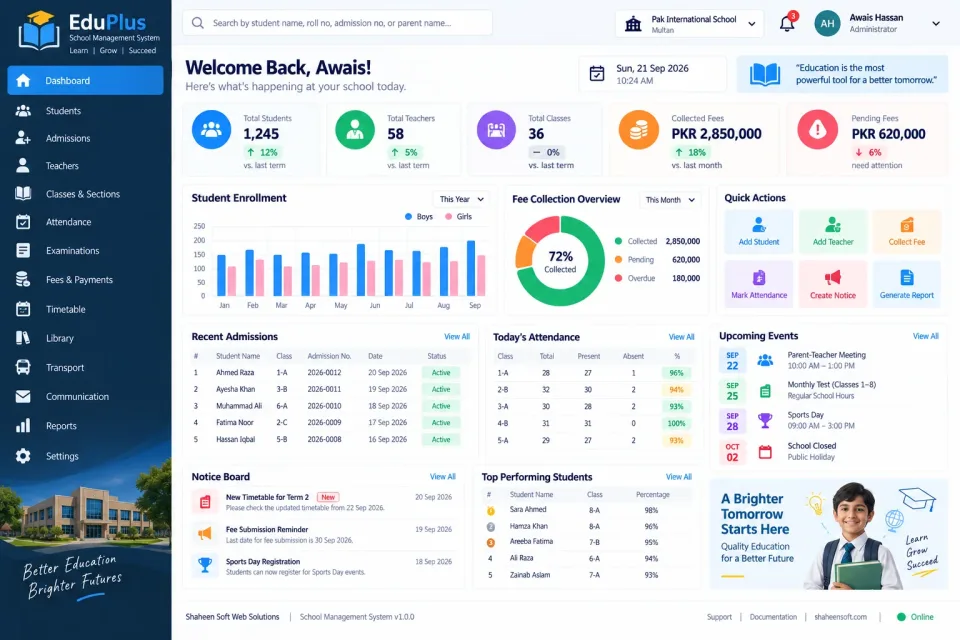
Most school offices run on three things that never quite agree: the admission register, the fee book and the result sheets. The system puts them in one place, starting with a complete record for every student from admission onwards.
Fees are the heart of it. Monthly fee vouchers are generated for every class, with concessions, sibling discounts and late fines applied consistently. Payments are recorded against each voucher and the defaulter list updates itself, so recovery no longer depends on someone remembering.
Attendance for students and staff, marks entry and graded result cards, class and section management, timetables and staff salaries complete the picture — and parents can be notified about fees, attendance and results.
A complete record for every student from admission to leaving.
Monthly vouchers per class with concessions, sibling discounts and fines.
An always-current list of unpaid fees by class and student.
Daily student and staff attendance with monthly summaries.
Marks entry, grading and printed report cards.
Organise classes, sections and subject allocation.
Class and teacher timetables without clashes.
Staff records, salaries, deductions and payslips.
Fee reminders, attendance and results sent to parents.
Collections, strength by class and academic performance.
Not just the software — everything needed to have your team using it.
From first call to your staff using it — up to two weeks.
A short call about how your business runs today and what the system must do.
We shape the system to your workflow, your branding and your reports.
We set it up on your computers or online and move your existing data across.
Your team is trained, and we stay on WhatsApp for anything after go-live.
Interested?
Tell us a little about your business and we will walk you through the system, answer your questions and send you a quote. No obligation.
We'll respond within 24 hours
It is a one-time price, not a monthly subscription. The final figure depends on the number of computers or branches, the features you need and any customisation, and you get a fixed quote after a short call.
Yes. Screens, receipts, reports, user roles and your branding are set up around how your business works. Features you need that are not listed can be added.
Yes. We install it, move your existing data across where needed, train your team and stay available on WhatsApp after go-live.