Quran & Qaida library
Noorani Qaida, Quran paras, kalimas, duas and Islamic books in one place — PDFs and images open with a single click.


Quran teaching software for online Quran classes — open Noorani Qaida, Quran, duas and Islamic books instantly and point to the exact word your student should read. Try every feature free for 3 days.
From download to your first class in a few minutes.
Click Download Free Trial to save the Quran Desk setup file to your computer.
Open the setup and follow the steps. If Windows asks, choose More info → Run anyway.
Open Quran Desk and click Start 3-Day Free Trial. No key needed — every feature is unlocked.
Enjoying it? Contact us before the trial ends and we send your licence key.
The trial is the full Quran Desk — not a cut-down demo.
Noorani Qaida, Quran paras, kalimas, duas and Islamic books in one place — PDFs and images open with a single click.
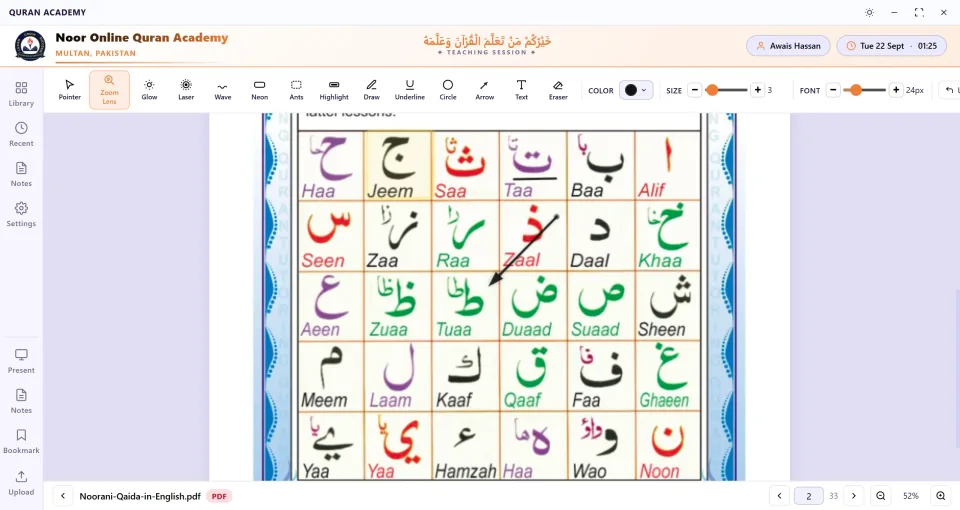
Pointer, zoom lens, glow, laser, wave, neon, marching ants, highlight, draw, underline, circle, arrow, text and eraser.
Magnify a single letter or harakah so the student sees exactly how it is written.
Pick the colour, stroke size and text size of every mark, and undo in one click.
Give the page the whole screen while you teach, without menus in the way.
Jump to any page of a PDF and zoom in or out to fit your screen share.
Bookmark the page each student reached and keep notes for every class.
Organise material in folders and a tree view, search by name, and filter by PDF, images or documents.
Quran Desk asks for a licence key. Choose a plan, contact us, and we send your key — enter it in the app and carry on teaching.
Yes. The 3-day trial is completely free and needs no card, payment or key. Download the setup, install it, open Quran Desk and click Start 3-Day Free Trial.
No. The trial is the full version of Quran Desk: the resource library, every pointer and highlighter, the zoom lens, present mode, notes, bookmarks, your academy branding and the dark and light themes.
The app asks for a licence key. Contact us on WhatsApp or through the form, choose a plan, and we send your key. Enter it in the app to carry on teaching — monthly, yearly and lifetime licences are available, and your licence period starts on the day you activate it.
Only to start the trial, to activate your licence key, and briefly about once a month so the app can check your subscription. Teaching from your library works offline on your own computer.
The free trial can be used once per computer. For several teachers or computers, see the 5 Teachers and Unlimited plans.
That message appears for new software that Windows has not seen many times yet. Download the setup only from this page, then click "More info" and "Run anyway" to install.
Windows 10 and Windows 11 computers and laptops (64-bit).
Download the free trial now — it takes a minute to install.