
Quran Academy Management System
Desktop student, teacher and fee management for an international online academy
Description
Noreen Online Quran Institute teaches students across several countries, with a roster of teachers running one-to-one classes at all hours. The administration behind that — who is enrolled, who is active, who has paid, which teacher is owed what — had outgrown spreadsheets.
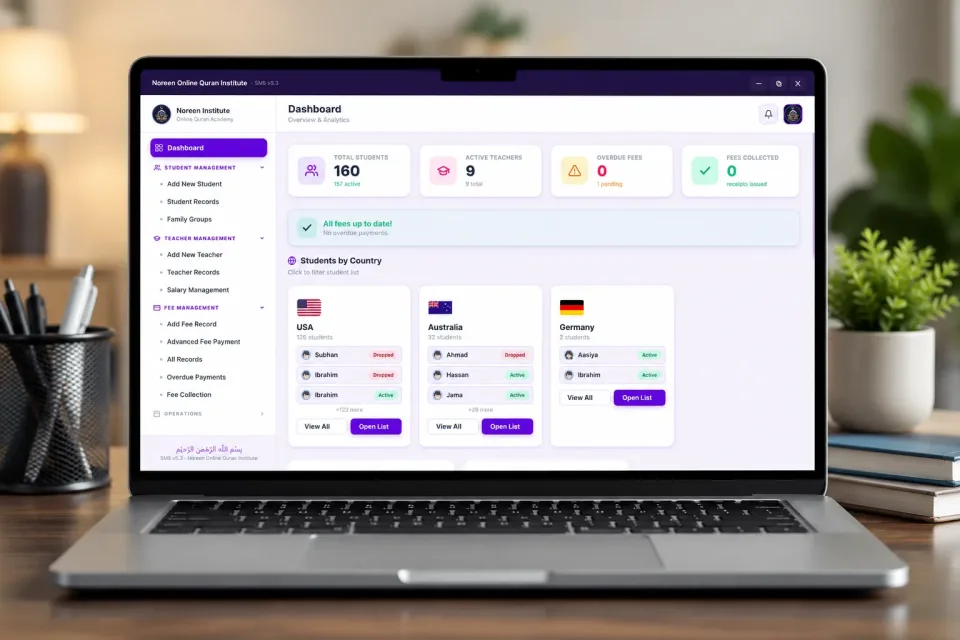
The system opens on a dashboard that answers the questions an academy administrator asks first thing in the morning: how many students are enrolled and how many of those are actually active, how many teachers are on the roster, whether any fees are overdue, and what has been collected. A standing banner confirms at a glance when no payments are outstanding.
Because the academy is international, students are grouped by country rather than presented as one long list. An administrator can see the roll for the United States, Australia or Germany separately, drill into any country's list, and see each student's status — active or dropped — without opening individual records. Families studying together are grouped so siblings are managed as a unit.
Fees are the part that carries the most detail. Alongside ordinary fee records there is an advanced payment screen for part payments and irregular schedules, a dedicated overdue view, and a collection log — because an academy billing families in several currencies and time zones rarely collects in neat monthly blocks. Teacher records carry their own salary management so what is earned and what is paid stay in the same system.
Project Highlights
12 key featuresLive Academy Dashboard
Enrolled and active student counts, teacher numbers, overdue fees and collections summarised the moment the software opens.
Students Grouped by Country
An international roll is split by country, so administrators work with one region at a time instead of a single long list.
Active & Dropped Tracking
Every student carries a visible status, making it obvious who is still attending and who has lapsed.
Family Groups
Siblings studying together are managed as one family unit rather than unrelated records.
Student Records
Full enrolment details held in one place, searchable and editable without touching a spreadsheet.
Teacher Records
The teaching roster is maintained in the same system as the students they teach.
Salary Management
What each teacher has earned and been paid is tracked against their record.
Fee Collection & Receipts
Payments are logged against the student and receipted, giving the academy a clean collection history.
Advanced Fee Payment
Handles part payments and irregular schedules, which is how families in different countries actually pay.
Overdue Payment Tracking
A dedicated view of who is behind, so chasing is deliberate rather than guesswork.
Local & Cloud Backups
Records are protected on the machine and synchronised off it, so an academy's history is never one hard drive away from loss.
Secure Access
Administrative access is protected, keeping student and payment data out of general reach.
Conclusion
The academy runs its enrolment, staffing and billing from one screen instead of a set of spreadsheets, with the status of every student and every payment visible without assembling a report.
The system was built to grow with the roll: adding students, teachers or another country changes nothing about how the academy is administered day to day.
Start a project like thisProject FAQ
3 questionsCan it manage students and teachers in different countries?
Yes. It was built for an academy teaching across several countries, with student and teacher records, family groups, fee collection and overdue tracking in one dashboard.
Can this system be customised for my academy?
Yes. Fee rules, salary handling, family discounts and reports can be set up the way your academy works.
Do you also have software for teaching the classes?
Yes. Quran Desk, our Quran teaching software, gives teachers a library of Qaida, Quran and dua resources with on-screen pointers to show students exactly which word is being taught. You will find it on our Software page.